

Black Friday 2026 for xCloud Lifetime Deal Owners: Upgrade, Add Servers and Save on Hosting
Updated November 19, 2026 · 7 min read
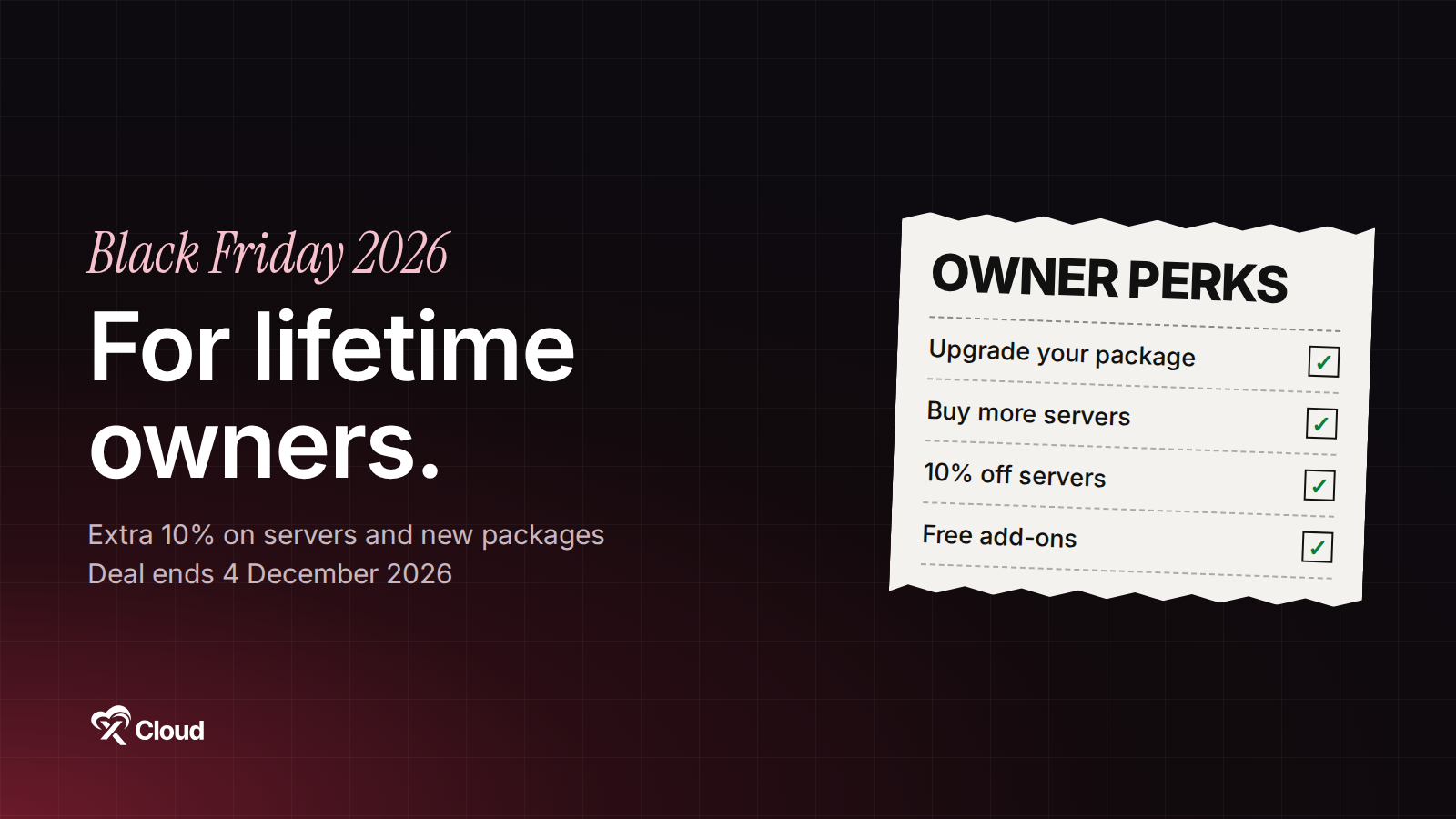
Yes, your xCloud lifetime deal is still getting better. Every lifetime package, old or new, gets everything we ship, including xCloud 3.0, at no extra cost. For Black Friday 2026, lifetime owners also get extra savings that aren’t on the public deal page: more server slots for less, 10% off servers on top of the Black Friday price, and free add-ons with new purchases.
This page explains each one, how to claim it, and how to get the most out of the deal before it ends on 4 December 2026.
What Your Lifetime Package Already Includes
You don’t need to buy anything to get the new features. Your lifetime package includes all of xCloud 3.0:
- Host anything: WordPress, Node.js, Laravel and any Docker or Docker Compose app on the same server, plus 1,000+ one-click apps.
- Deploy from Git with zero downtime, and roll back in one click.
- The AI Assistant in your dashboard, and xCloud MCP so Claude, Cursor or Codex can run your servers.
- Security we handle for you: when a big vulnerability hits nginx, PHP or Linux, we patch connected servers for you. Every response is on our zero-day security record.
- xCloud Provider: Vultr servers billed through xCloud at 10% below Vultr’s own price, any time of year. See xCloud Provider for lifetime owners.
Your Black Friday 2026 Owner Perks at a Glance
| What you want | How to get it | Owner extra |
|---|---|---|
| More server slots | Upgrade your package, or buy another one | Extra 10% off a new package with your owner code |
| A server we host for you | Cloud VPS or High Frequency Managed Server | 10% off the Black Friday price, automatically |
| Free add-ons | Buy a new package, or a server for 12 or 24 months | Mail Delivery, mailboxes, Patchstack and Cloudflare Enterprise free for up to 12 months |
| Bigger savings | Buy 2 or more packages in one order | Extra 5% off the order |
Get More Server Slots
You have two ways to add server slots. Pick the one that fits your plans.
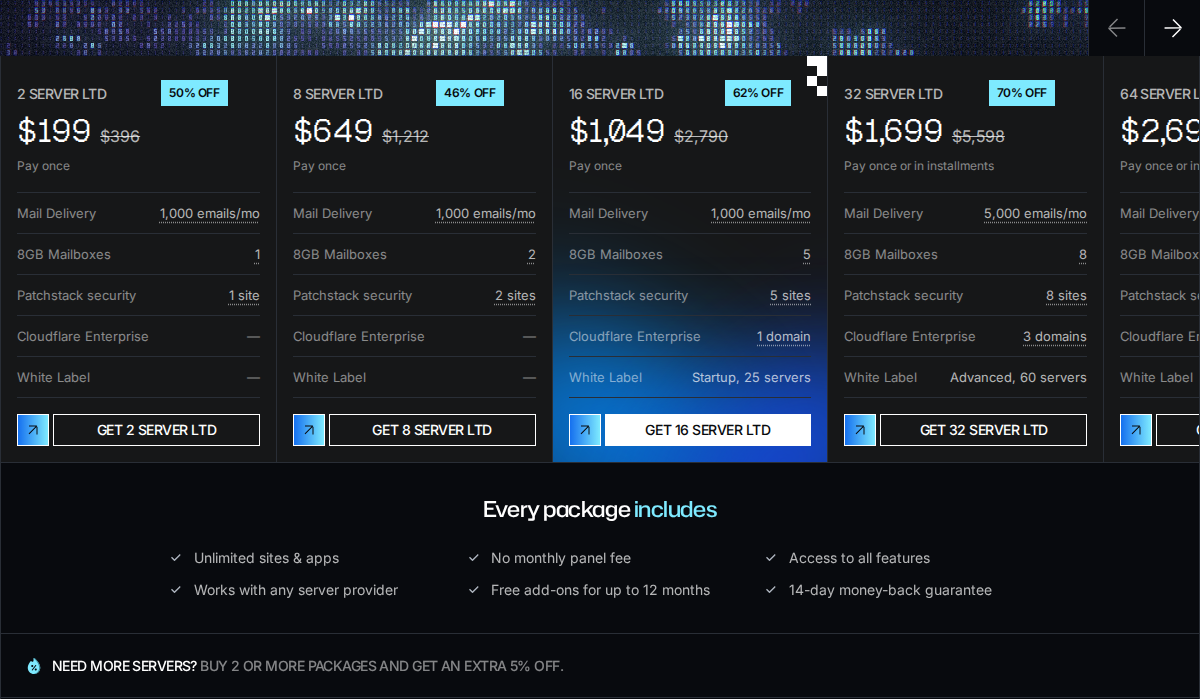
Option 1: Buy another lifetime package (servers add up)
A new lifetime package adds its servers to the ones you already have. If you own a 10-server package and buy the 16 Server LTD, you can connect 26 servers.
- Your owner code takes an extra 10% off any new lifetime package, on top of the Black Friday price. The code is in the email we sent to lifetime owners. Can’t find it? Ask support.
- Buy 2 or more packages in one order and get an extra 5% off the order.
- New packages come with free add-ons, and the 16, 32, 64 and 128 Server LTDs include White Label.
| Package | Black Friday price | Your price with the owner code |
|---|---|---|
| 2 Server LTD | $199 | $179.10 |
| 8 Server LTD | $649 | $584.10 |
| 16 Server LTD | $1,049 | $944.10 |
| 32 Server LTD | $1,699 | $1,529.10 |
| 64 Server LTD | $2,699 | $2,429.10 |
| 128 Server LTD | $3,999 | $3,599.10 |
Buy it while signed in to the team that owns your current lifetime package, so the new servers are added to the same team.
Option 2: Upgrade your current package (pay only the difference)
An upgrade moves your package to a bigger one, and you pay only the difference shown at checkout. Your server count becomes the new package’s count.
-
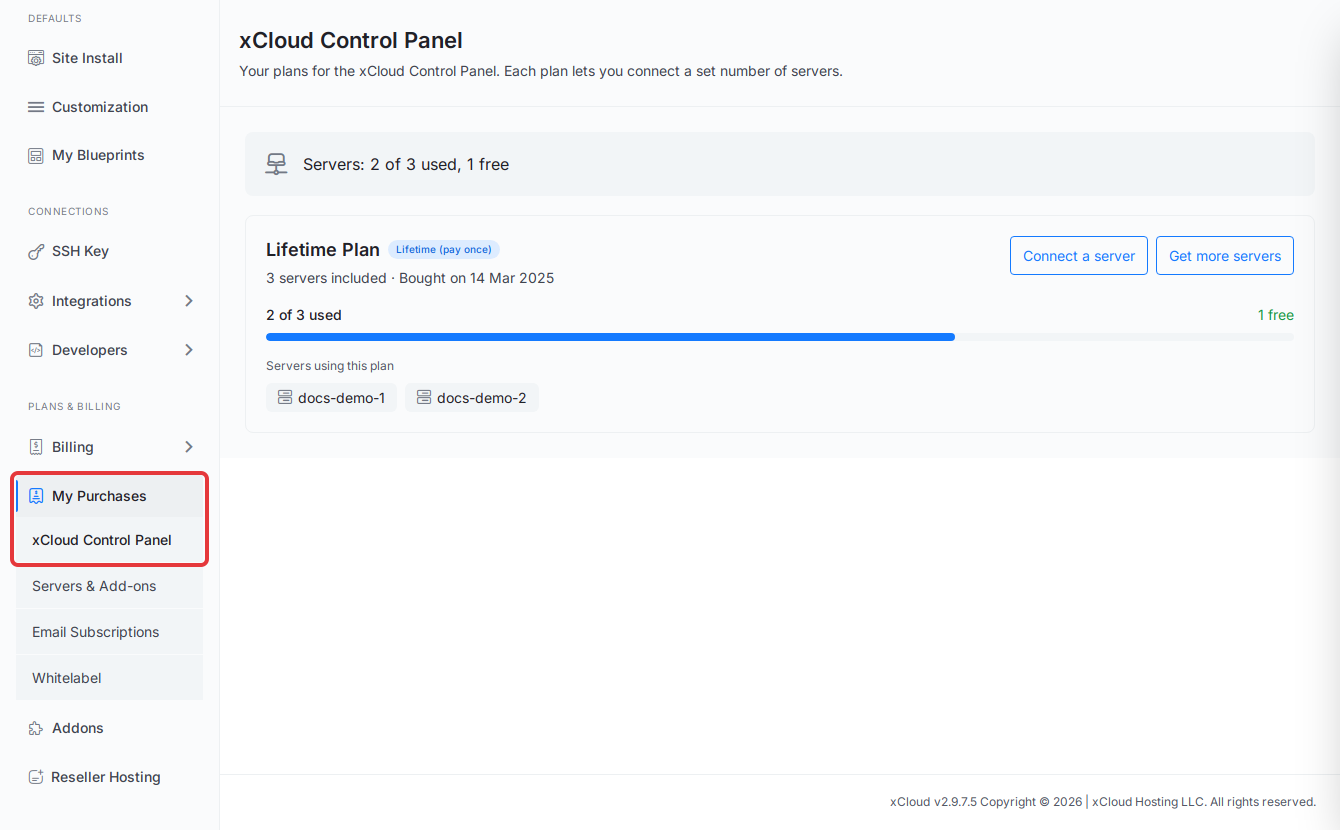
Click Settings in the left menu. Under Plans & billing, click My Purchases → xCloud Control Panel.
-
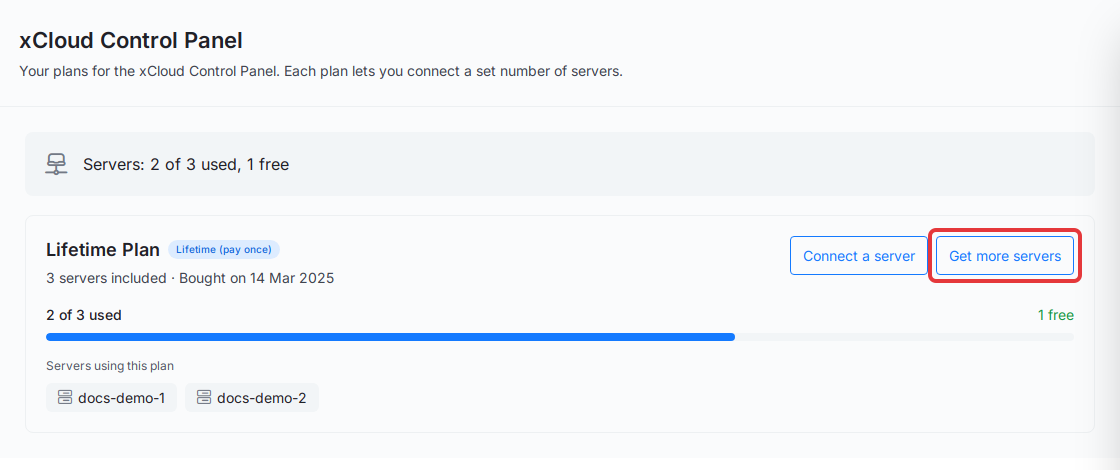
On your plan’s card, click Get more servers.
-
Under Choose Your New Package, pick a package, check the Total: line and click Upgrade Now & Pay Only.
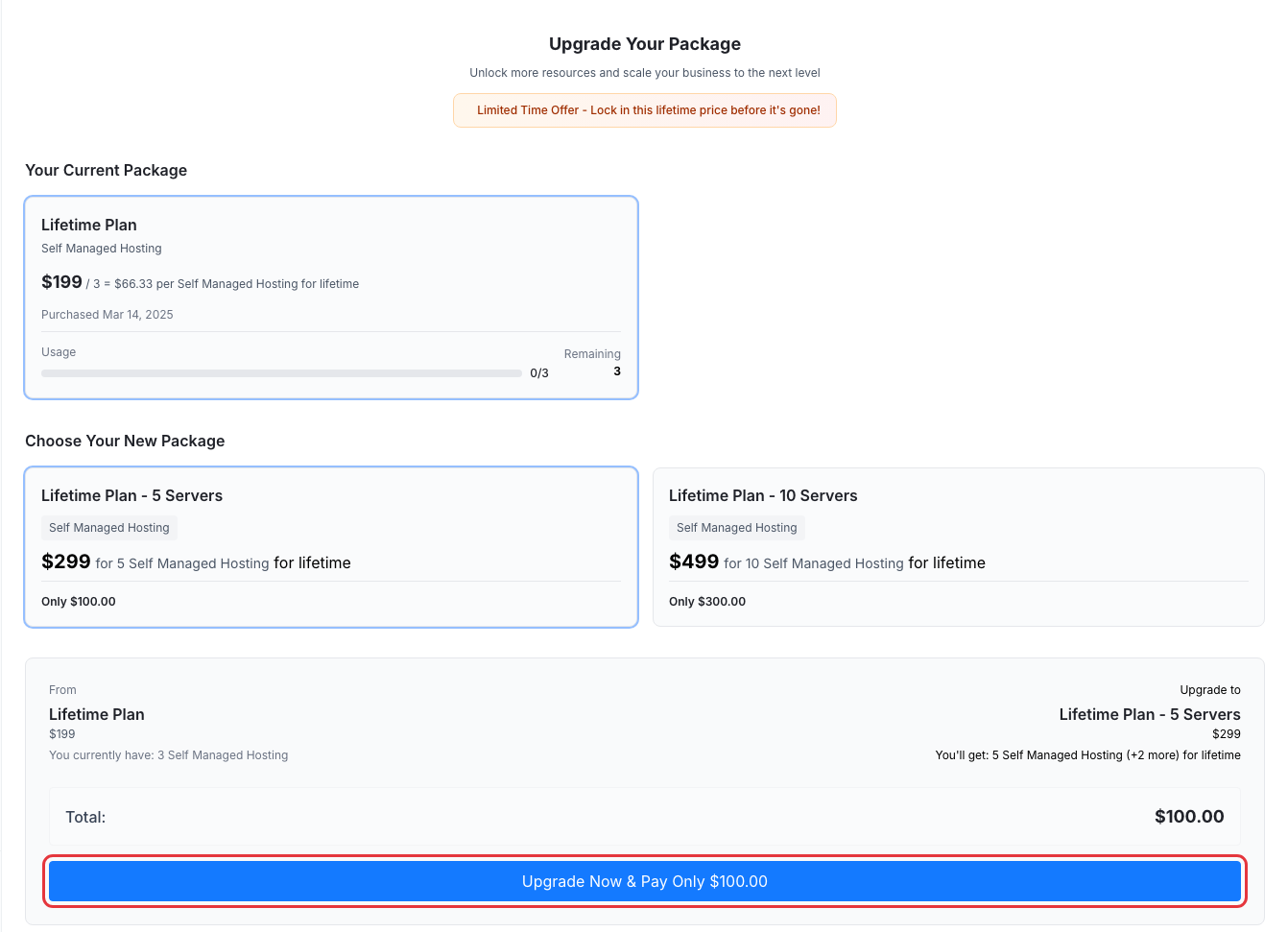
The plan names and prices in this screenshot are examples.
Upgrades add server slots only. The owner code and the free add-ons don’t apply to them. Full steps: How to upgrade your lifetime package.
Already have servers connected? Move them onto your package
Servers you connected before buying a lifetime package stay on their monthly bill until you move them. A new package doesn’t take them over by itself. For each server:
- Open the server in xCloud. Its Overview page shows a Lifetime Package Available banner.
- Click Convert to LTD.
- Under Select a Lifetime package for this server, pick your package. It shows how many of its servers are still available.
- Click Convert to LTD.
The server moves to lifetime billing, its monthly bills stop, and it takes one of your package’s server slots. This works for servers you bring from your own provider (Self-managed). The banner doesn’t show when a package has no free slots left.
Which one should you pick? If you want the free add-ons and the owner code’s extra 10%, buy another package. If you’d rather keep one package and pay the smallest amount today, upgrade.
Save More on Hosting: 10% Off Servers, Automatically
As a lifetime owner, you pay 10% less than the Black Friday price on servers we host for you. No code is needed: the owner price shows when you’re signed in to the team that owns your lifetime package. On the deal page, click the LTD OWNER tab to see your prices.
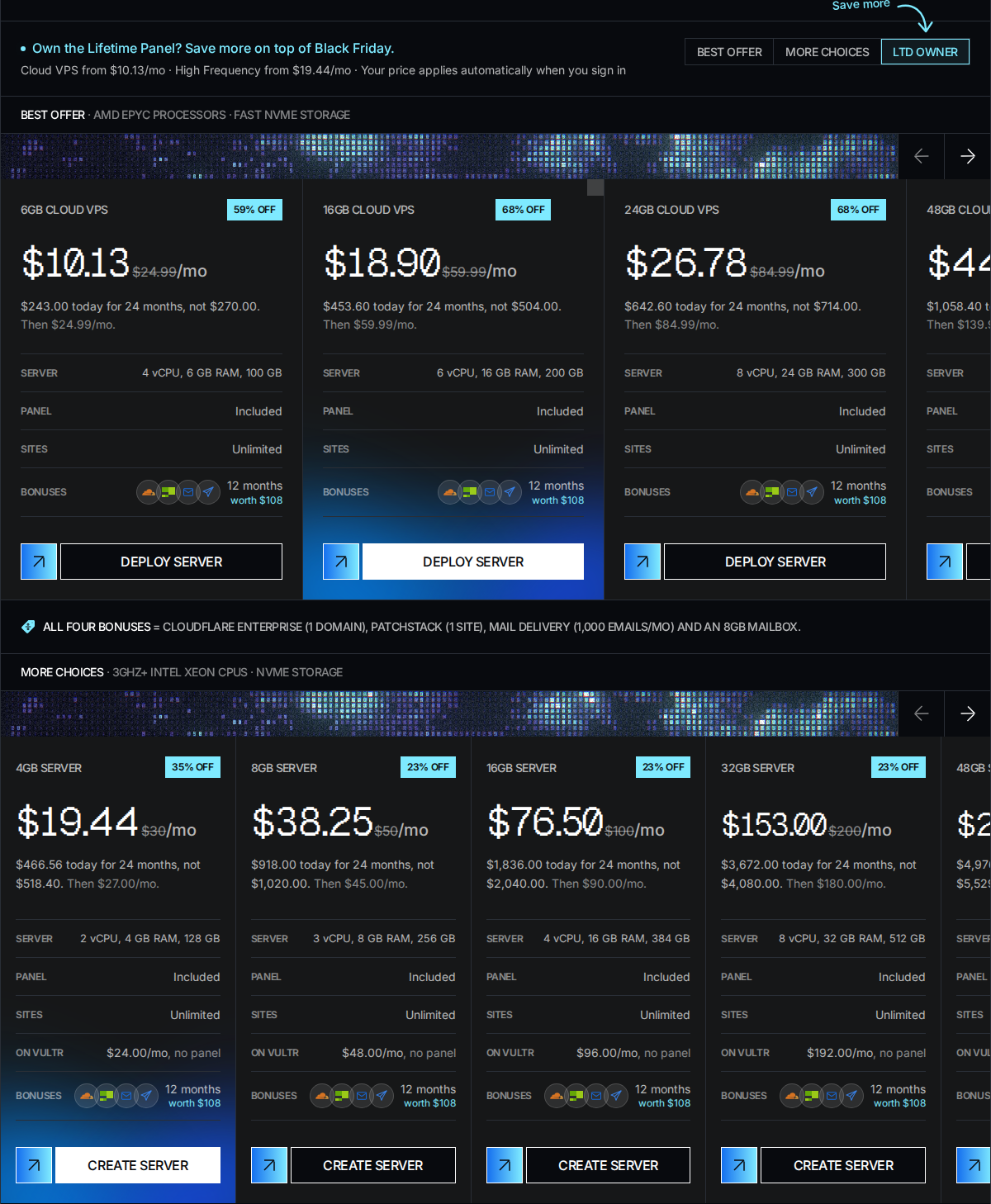
Cloud VPS (panel included, unlimited sites). Owner prices on the 24-month plan:
| Plan | Regular price | Your price | You pay today for 24 months |
|---|---|---|---|
| 6GB Cloud VPS | $24.99/mo | $10.13/mo | $243.00 |
| 16GB Cloud VPS | $59.99/mo | $18.90/mo | $453.60 |
| 24GB Cloud VPS | $84.99/mo | $26.78/mo | $642.60 |
| 48GB Cloud VPS | $139.99/mo | $44.10/mo | $1,058.40 |
| 64GB Cloud VPS | $219.99/mo | $69.30/mo | $1,663.20 |
| 120GB Cloud VPS | $379.99/mo | $119.70/mo | $2,872.80 |
High Frequency Managed Servers in a Vultr data center, from 4GB, paid for 24 months. As an owner you pay less than Vultr’s own monthly price for the same server, and xCloud sets it up, secures it and backs it up:
| Server | On Vultr directly | Your owner price | You pay today for 24 months |
|---|---|---|---|
| 4GB | $24.00/mo, no panel | $19.44/mo | $466.56 |
| 8GB | $48.00/mo, no panel | $38.25/mo | $918.00 |
| 16GB | $96.00/mo, no panel | $76.50/mo | $1,836.00 |
| 32GB | $192.00/mo, no panel | $153.00/mo | $3,672.00 |
The deal price covers your first term. After it, the server renews at the price shown on its card and at checkout. Cloud VPS stock is limited.
The deal prices are for new servers only. A server you already have keeps its current price. To move it onto a deal price, create a new server during the deal and move your sites with Full Server Migration.
Claim Your Free Add-ons
Every new purchase in the deal comes with add-ons free for a set time:
| Add-on | With a new lifetime package | With a 12 or 24-month server |
|---|---|---|
| Mail Delivery | 1,000 emails/mo (2, 8 and 16 Server LTD) or 5,000 (32, 64 and 128), for 12 months | 1,000 emails/mo for 12 months |
| 8GB Mailbox | 1 to 10 mailboxes for 12 months | 1 mailbox for 12 months |
| Patchstack | 1 to 10 sites for 6 months | 1 site for 12 months |
| Cloudflare Enterprise | 1 domain (16 Server LTD), 3 (32) or 5 (64 and 128), for 6 months | 1 domain for 12 months |
When a free period ends, the add-on stops unless you choose to keep it at its regular price. You’re never charged automatically. Servers paid monthly don’t include free add-ons.
How to Get the Most Out of Black Friday 2026
- Plan for next year now. Servers paid for 24 months lock the deal price for two years, and the free add-ons run for the first 12 months.
- Grow your server slots at the lowest price. If you’ll need more servers next year, buy a package now with your owner code, before 1 December.
- Stack to save more. Two packages in one order take another 5% off.
- Move hosting you pay for elsewhere. A 6GB Cloud VPS is $10.13/mo with the panel included, and a 4GB High Frequency server is $19.44/mo, less than the $24.00/mo Vultr charges for the same server on its own.
- Use the right team. Owner prices and new server slots go to the team you’re signed in to. Switch to the team that owns your lifetime package first.
Key Dates
| Date | What happens |
|---|---|
| Fri 20 November 2026 | The Black Friday deal opens to everyone (lifetime owners got early access) |
| 1 December 2026 | Last day to use your owner code on new lifetime packages |
| 4 December 2026, 23:59 UTC | The Black Friday 2026 deal ends |
Lifetime packages come with a 14-day money-back guarantee. See every package and server on the Black Friday deal page.
Frequently Asked Questions
Do old xCloud lifetime deals get the new features?
Yes. Every lifetime package, whenever you bought it, gets everything we ship, including xCloud 3.0, at no extra cost. You don’t need to buy a new package to get new features.
If I buy another lifetime package, does it add to my servers or replace them?
It adds to them. A new package’s servers are added to the servers you already have, as long as you buy it on the team that owns your current package. Upgrading is different: it replaces your package with a bigger one, so your total becomes the new package’s server count.
How do I move my existing servers onto my new lifetime package?
Open each server in xCloud. On its Overview page, click Convert to LTD on the Lifetime Package Available banner, select your lifetime package and click Convert to LTD. The server moves to lifetime billing and its monthly bills stop. Repeat for each server, up to your package’s server count.
Do lifetime owners get a discount on Black Friday?
Yes, two. Servers: you pay 10% less than the Black Friday price on Cloud VPS and on High Frequency Managed Servers from 4GB, applied automatically when you’re signed in to the team that owns your package. New lifetime packages: your owner code takes an extra 10% off. It is in the email we sent to lifetime owners.
Can I use my owner code on an upgrade or on a server?
No. The owner code works only on a new lifetime package, from 2 to 128 servers. Upgrades are charged the difference between your package and the bigger one. Servers get the owner price automatically, with no code.
Can I switch my existing servers to the Black Friday price?
No. Black Friday prices are for new servers only, so servers you already have keep their current price. To get the deal price, create a new server during the deal, move your sites to it with Full Server Migration, then delete the old server.
Does my existing lifetime package get the free add-ons?
No. The free add-ons come with new purchases: a new lifetime package, or a Cloud VPS or Managed Server paid for 12 or 24 months. Upgrades add server slots only.
I’m a lifetime owner but I don’t see the owner price. What do I do?
Sign in and switch to the team that owns your lifetime package before you open the checkout. The owner price is tied to that team. If you still see the regular deal price, contact support.
When do the Black Friday 2026 owner deals end?
The Black Friday deal ends on 4 December 2026 at 23:59 UTC. Your owner code for new lifetime packages works until 1 December 2026. Server stock is limited.
If you run into any issues claiming your owner perks, feel free to reach out to our support team.