

How the xCloud Affiliate Program Works
Updated November 24, 2026 · 5 min read
The xCloud affiliate program pays you for sending new customers to xCloud. It is free to join, and you earn up to 20% of every payment your referrals make during their first 12 months. Payouts are usually made monthly once you reach $100. You apply, get your own referral link, share it, and follow clicks, sign-ups and sales in your affiliate dashboard.
The terms below are from the xCloud affiliate program page, as of 24 November 2026. That page is always the current source; check it before you plan a campaign.
The program at a glance
| Commission | Up to 20% of every payment your referral makes |
| How long | The referral’s first 12 months after they subscribe (on a 24-month plan, its first 12 months) |
| What earns 20% | Panel plans, lifetime offers and Cloud VPS |
| What earns less or nothing | Managed Servers earn a lower rate, and none when a Lifetime Panel owner buys them at the owner price (10% less). Add-ons (Mail Delivery, Mailboxes, Patchstack, Cloudflare Enterprise) earn no commission |
| Payouts | Usually monthly, to the payment method you set in your affiliate dashboard |
| Minimum payout | $100 |
| Tracking | Clicks, sign-ups and sales in real time in your affiliate dashboard |
| Cost to join | Free |
Commission stops after the referral’s first year. A customer who stays with xCloud for three years earns you commission on their first 12 months of payments only.
Step 1: Open the affiliate program page
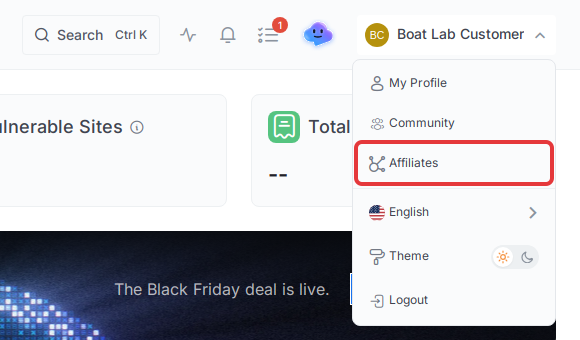
If you already use xCloud, click your name in the top-right corner of the dashboard to open the profile menu, then click ‘Affiliates’. The affiliate program page opens in a new tab. You don’t need an xCloud account to join: anyone can open that page directly.
Step 2: Apply to join
On the affiliate program page, click ‘Become an affiliate’. The sign-up form on the affiliate site (affiliate.xcloud.host) opens. Fill in the short form and submit it. You hear back once your application is reviewed.
You get your own referral link and an affiliate dashboard only once it is approved. Bloggers, YouTubers, agencies, freelancers, developers, trainers and community admins can all apply. If you already have an affiliate account, use ‘Affiliate login’ on the same page.
Step 3: Share your referral link
Put your link wherever your audience decides what to host on: blog posts, tutorials, YouTube videos, newsletters, social posts or client proposals. Clicks, sign-ups and sales from your link then show in your affiliate dashboard.
Follow these rules from the affiliate program page:
- Don’t distort facts or misrepresent what xCloud does to get a sale.
- Don’t use your own affiliate link to buy for personal use.
- Don’t share your link on discount or coupon listing sites, and don’t share unofficial discount offers.
- Don’t run paid ads on xCloud’s brand name or variations of it.
Step 4: How you get paid
After you are approved, you choose your payout method in your affiliate dashboard on the affiliate site (affiliate.xcloud.host, reached with ‘Affiliate login’). Commissions are usually paid monthly once your balance reaches the $100 minimum. Your affiliate dashboard shows your clicks, sign-ups and sales in real time.
Every affiliate also gets a dedicated affiliate manager for questions and promotion ideas.
Affiliate program or White Label: which one fits you
xCloud has two programs for people who recommend hosting. They work very differently.
| Affiliate program | xCloud White Label | |
|---|---|---|
| How you earn | Commission on payments from customers you refer | You set your own prices for your hosting packages |
| Brand the customer sees | xCloud | Yours: your domain and logo, no xCloud branding in the portal |
| Who the customer pays | xCloud | You, through your own Stripe account |
| Cost | Free | A monthly White Label plan from $25/month, plus the servers you resell (xCloud Managed Servers, or your own Self-managed server plus a per-sale platform fee). See White Label pricing for current prices |
| Best for | Bloggers, YouTubers, newsletters, communities | Agencies and freelancers with paying clients |
Choose the affiliate program if you have readers or viewers. Choose White Label if you host sites for your own clients and want to bill them under your brand. See xCloud White Label and how to set up a reseller account to start reselling.
The ‘Affiliates’ item does not appear in a White Label dashboard, so customers of a White Label reseller don’t see it.
Frequently asked questions
Is it free to join the xCloud affiliate program?
Yes. Joining is free. You apply with a short form, and once you are approved you get your own referral link and affiliate dashboard.
How long do I earn commission on a customer I refer?
You earn on the customer’s payments for the first 12 months after they subscribe. Commission does not continue after that first year. On a 24-month plan, its first 12 months count.
When and how do I get paid?
Payouts are usually made monthly, to the payment method you set in your affiliate dashboard. The minimum payout is $100.
Can I buy through my own affiliate link?
No. Using your own link to buy for personal use is not allowed. The link is for the people you refer.
Related docs
If you run into any issues with your xCloud account, feel free to reach out to our support team.